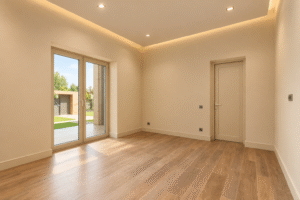


A long room with desks or counters is difficult to illuminate evenly with a small number of concentrated light sources. Bright patches alternate with darker areas, and furniture can cast shadows across the work surface. LED linear lighting offers an elongated distribution that often follows the geometry of desks, tables and circulation routes more naturally. The system still needs careful design: fixture length, height, spacing, beam direction and controls determine whether the work area is comfortable. Choosing a long luminaire simply because the room is long leaves too many practical questions unanswered.
Relate each line to a specific working area
Begin by mapping desks, meeting tables, storage and circulation. One continuous line above the room’s centre may look ordered on a reflected ceiling plan, yet miss important workstations near the walls. Multiple shorter lines can sometimes serve users more effectively if they align with actual work zones. The design should describe where light arrives, not just where it is emitted.
For shared offices, consider the range of desk configurations expected during the next few years. A line fixed over a particular row may become poorly positioned when workstations are rotated. The more flexible the room layout, the more useful it is to evaluate general distribution and task lighting together. Keep light levels and user comfort in view before committing to a permanent pattern.
Compare direct, corner and overhead arrangements
The shape of a luminaire influences where its light falls. A corner-type line can direct illumination toward an adjacent surface, while a downward overhead fitting may provide more direct light to a table or workbench. Orientation is therefore part of the specification. A fixture installed at a different angle from the intended design can create unwanted reflections or dark areas.
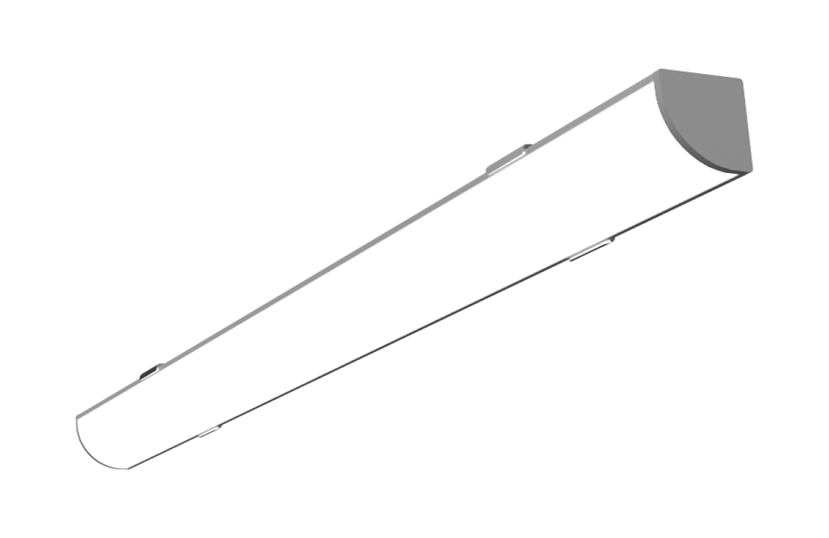
The Linear Luminaires selection includes linear forms with different configurations and electrical ratings, so a model-by-model comparison is necessary. Confirm its exact length, input voltage, power, luminous output and mounting instructions. Product appearance alone cannot tell whether a fitting is suitable for a low shelf, an open-plan office or a high ceiling. Electrical compatibility matters especially when several units will share one circuit.
Make continuous lines appear truly continuous
Several luminaires installed end to end can create a strong architectural line. Small differences in mounting height or angle, however, become obvious when adjacent sections are switched on. Draw one long reference line and use it during installation. Verify the location of each fixing point before the first fitting is mounted; correcting an accumulated error at the far end can require substantial rework.
Joint details affect both appearance and maintenance. Some systems support closely abutting housings, while others require a defined gap or connection component. Follow the selected product’s installation guidance and do not assume fittings from unrelated series join seamlessly. A continuous visual line may still require separately accessible electrical connections and a logical circuit layout behind the finished surface.
Choose spacing from distribution and mounting height
A fixture’s stated length does not fully describe the pattern it creates on a desk. Optical construction, mounting height and distance to neighbouring lines affect uniformity. A narrow distribution can create bright strips directly underneath the luminaire, while a broader beam fills the space more gently. The relationship becomes especially important where several rows illuminate a large office.
Review photometric data when available, or create a short temporary installation before repeating a layout across the building. Check desk surfaces and vertical faces, since people need to recognise colleagues and read notice boards as well as see their keyboards. Avoid judging the system by floor brightness alone; a floor can appear bright while a work surface remains in shadow.
Control glare above computer screens
Long luminous elements can reflect as conspicuous bands in glossy monitors. Their position relative to the user’s viewing direction is therefore crucial. Look at a typical workstation in the proposed arrangement, with the screen at its normal angle. If the fixture creates a strong reflection, adjust its position, orientation or shielding before fixing the entire row.
Very bright luminaires directly above seated users can also become uncomfortable in peripheral vision. Optical diffusers and appropriate distribution help, but each device has limits. Large offices may require professional glare assessment and compliance with applicable workplace lighting standards. In smaller home offices, practical mock-ups and manufacturer data are useful ways to refine the design before purchase.
Plan power and switching in understandable zones
When one room contains several lighting lines, a single switch may waste energy and reduce flexibility. Separate circuits for the main work area, meeting table and circulation route make different modes of operation possible. Consider how daylight enters the room: a row near large windows may require less artificial light in the afternoon than the row beside an internal wall.
Drivers and controls must match the specified electrical characteristics. Check the total connected load, suitable conductor sizes and accessible locations for any external equipment. Dimming requires compatible luminaires or drivers rather than merely replacing a normal wall switch with a dimmer. Record the final circuit schedule so future installers can identify which line belongs to each control.
Consider cleaning and future reconfiguration
Linear fittings in offices gather dust along edges and diffusers. Choose mounting positions that allow safe routine cleaning and leave access for servicing. If the room is expected to change function, favour arrangements that can be adjusted without damaging expensive ceiling finishes. Surface-mounted products may offer useful flexibility, while integrated systems provide a different visual result.
A long line also changes how furniture appears. It can emphasise a conference table, guide movement through a corridor or create a sense of order above repeated desks. That visual benefit is strongest when the physical line corresponds to how the space is used. Decorative alignment should support, rather than contradict, practical illumination.
Check the design with actual users
The final review belongs at the work surface. Ask users to read a document, look at their screens and move between desks while the proposed fittings are operating. Uneven brightness, intrusive reflections or awkward switch groupings become evident during those activities. Assess the installation with window blinds in typical daytime positions and under artificial light alone.
Well-planned linear lighting provides orderly ceiling geometry and usable brightness where people work. Achieving both requires attention to optical distribution, mounting alignment, circuit design and the possibility of furniture changes. A carefully chosen line becomes an adaptable part of the room rather than a fixed pattern imposed on everyone using it.